An Analysis of a Lua Obfuscation and its Deobfuscation
Note: This is not a tutorial for obfuscation nor deobfuscation. This post is for educational purposes only.
Recently, before I serve for the military to fulfill my duty as a Korean, I have some time to play around Lua obfuscation and its deobfuscation. I found a Lua obfuscation that is quite interesting and decided to analyze it. In this post, I will explain the obfuscation and its deobfuscation.
This is not a general deobfuscation that can be applied for everywhere. It is a Lua obfuscation that is used in a specific Lua script. The obfuscation is not strong, but it is enough to make the script unreadable.
Introduction
According to Lua’s about page, Lua is described as follows:
Lua is a powerful, efficient, lightweight, embeddable scripting language. It supports procedural programming, object-oriented programming, functional programming, data-driven programming, and data description.
As you can see, Lua is a powerful language that can be used in various fields. It is widely used in game development or game plugins. For instance, Roblox uses Lua as its scripting language.
However, Lua is not a perfect language. It has some weaknesses. One of the problems is that Lua is easy to interpret. This means that Lua scripts can be accessed and read the original source code easily.
To prevent this, some developers obfuscate their Lua scripts. In this post, I will analyze obfuscated Lua script and deobfuscate it.
Analysis
First, we need to gain the obfuscated Lua script. I will not provide the method how to intercept the script since this post is about the analysis and deobfuscation.
After gaining the obfuscated Lua script, we can start the analysis.
Obfuscated Lua Script
This is one of the obfuscated Lua scripts that I have gained.
return function(self, player)
    return _G
    ["\u{5F}\u{006C}\u{0049}\u{0069}\u{0049}\u{049}\u{49}\u{049}\u{49}\u{049}\u{0069}\u{69}\u{006C}\u{69}\u{6C}\u{69}\u{06C}\u{49}\u{69}\u{069}\u{006C}\u{49}\u{6C}\u{6C}\u{6C}\u{49}\u{049}\u{49}\u{0049}\u{06C}\u{69}\u{69}\u{49}\u{006C}\u{006C}"]
    ["\u{69}\u{0069}\u{0049}\u{69}\u{6C}\u{49}\u{69}\u{6C}\u{6C}\u{049}\u{049}\u{049}\u{69}\u{006C}\u{0069}\u{6C}\u{6C}\u{006C}\u{6C}\u{6C}\u{6C}\u{49}\u{6C}\u{6C}\u{069}\u{49}\u{6C}\u{49}\u{49}\u{49}\u{049}\u{69}\u{49}\u{49}"]
    [(115026039) - (209161548) + (94135520)](self, player)
end
I have changed the original script to prevent the script from being abused.
In the first glance, you can see that the script is obfuscated. Now, let’s analyze the script.
Let’s see what we can observe from the script.
- The script returns a function.
- The function takes two arguments,
selfandplayer. - The function returns
_Gobject. - The function accesses a table with a key that is obfuscated.
- The function calls the accessed table with arguments
selfandplayer. - The key is obfuscated with Unicode characters.
- The key is obfuscated with a simple calculation.
Restoring Basic Obfuscation
Now, we know that they are accessing a table with a key that is obfuscated. We can restore some parts. For instance, we can restore the key that is obfuscated with Unicode characters and a simple calculation.
I wrote a simple Python script:
import re

def convert_lua_unicode_to_python(match):
    """Convert a Lua Unicode escape sequence to a Python-compatible Unicode character."""
    lua_sequence = match.group(0)
    hex_sequence = lua_sequence[3:-1]
    char = chr(int(hex_sequence, 16))
    return char

def evaluate_expression(match):
    """Evaluate the arithmetic expression found within parentheses."""
    numbers = [int(match.group(i)) for i in range(1, 6, 2)]
    operators = [match.group(i) for i in range(2, 6, 2)]
    try:
        result = eval(f"{numbers[0]} {operators[0]} {numbers[1]} {operators[1]} {numbers[2]}")
        return f"{result}"
    except Exception as e:
        return match.group(0)

def process_lua_content(content):
    """Process the Lua content, simplifying expressions within brackets and decoding Unicode sequences."""
    content = re.sub(r"\((\d+)\)\s*([+-])\s*\((\d+)\)\s*([+-])\s*\((\d+)\)", evaluate_expression, content)
    content = re.sub(r'\\u\{\w+\}', convert_lua_unicode_to_python, content)
    return content
The idea is simple. We convert the Lua Unicode escape sequences to actual characters and evaluate the arithmetic expressions within parentheses.
Let’s see the result:
return function (self,player)
return _G["_lIiIIIIIIiilililIiilIlllIIIIliiIll"]["iiIilIillIIIilillllllIlliIlIIIIiII"][11](self,player)
end
Now, we can see more clearly. The key is restored. The function returns a function that accesses a table with a key _lIiIIIIIIiilililIiilIlllIIIIliiIll and calls the accessed table with arguments self and player.
Investigating the Table
So, with this information, we can think since it looks like a table so we can guess that the table is a function.
Unfortunately, _G["_lIiIIIIIIiilililIiilIlllIIIIliiIll"] is not a table. It is a some kind of a game script.
Without mapping _G["_lIiIIIIIIiilililIiilIlllIIIIliiIll"]["iiIilIillIIIilillllllIlliIlIIIIiII"], the creator of the script cannot execute the script. Thus, they must have a way to map the key. As I said before, the weakness of Lua is that it is easy to interpret which means we can find the mapping function, too.
Chunks
We need to know where do they actually map the functions. Fortunately, I have found them.
There are scripts called chunk which load up the internal scripts:
return function ()
return {[1]="_Items",[2]="_ItemInfoMan",[3]="LocalPlayer",[4]="WsUser",[5]="CharacterName"}
end
This is the partial script of the chunk. I have deobfuscated the chunk script and found that the chunk script returns a table that maps the keys to the actual keys.
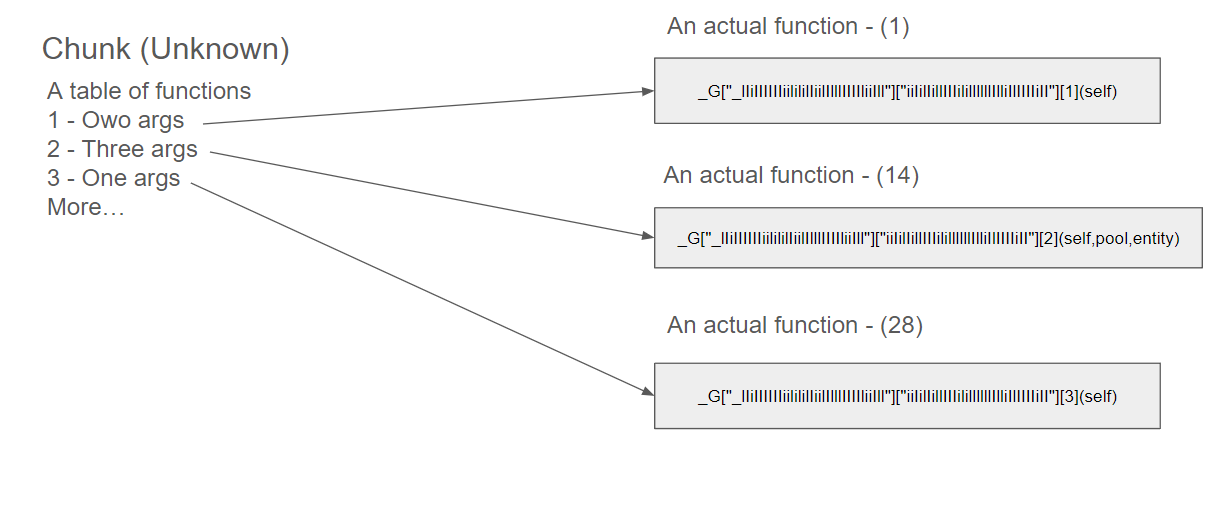
Matching the Keys
Since we have an access to the Lua environment, we can execute the chunk script and get the mapping functions.
What I did were extracted all tables of keys which are returned by the chunk script and executed the chunk script.
The actual data that is mapped by the chunk script looks like:
_G["_IIIIiiiIlililIiIllIilliiIiiillIIliIlli"]["lliIillIIIllllilIliIIiIiIiiIlIIliIi"]':
{1:"ClearAnimationTimer",2:"DisableTweenFloating",3:"Entity",4:"TransformComponent",...}
Now, we have all the necessary information to deobfuscate the script.
Deobfuscation
By using the previous information, we can deobfuscate the inside of each function.
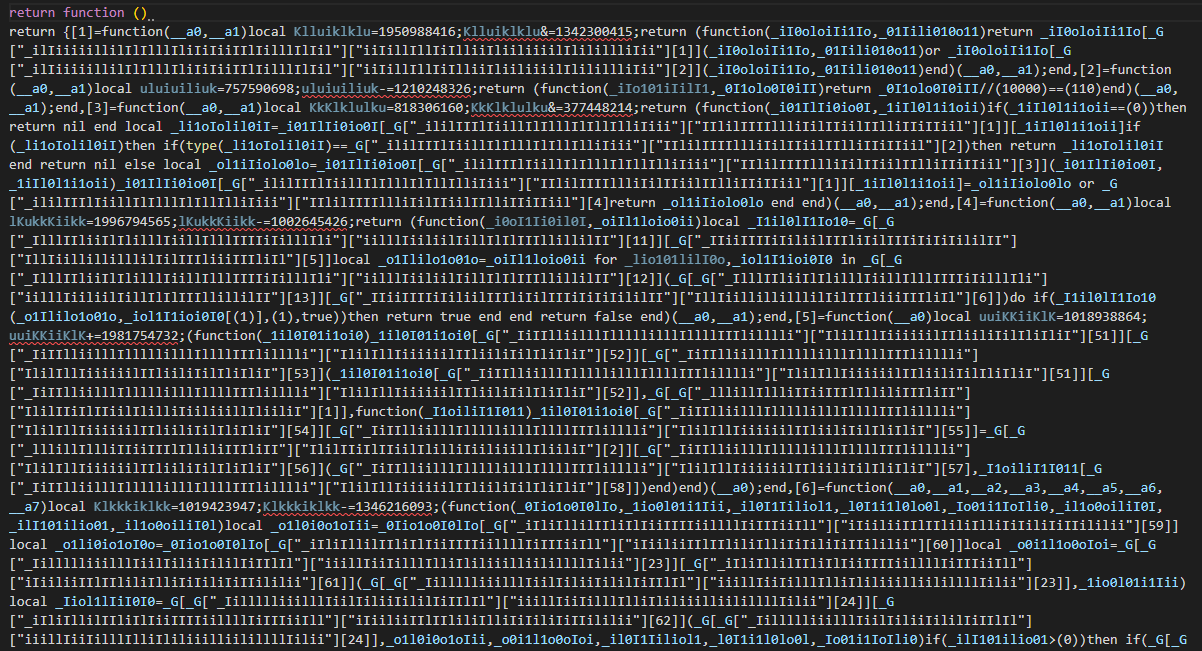 Before Decryption
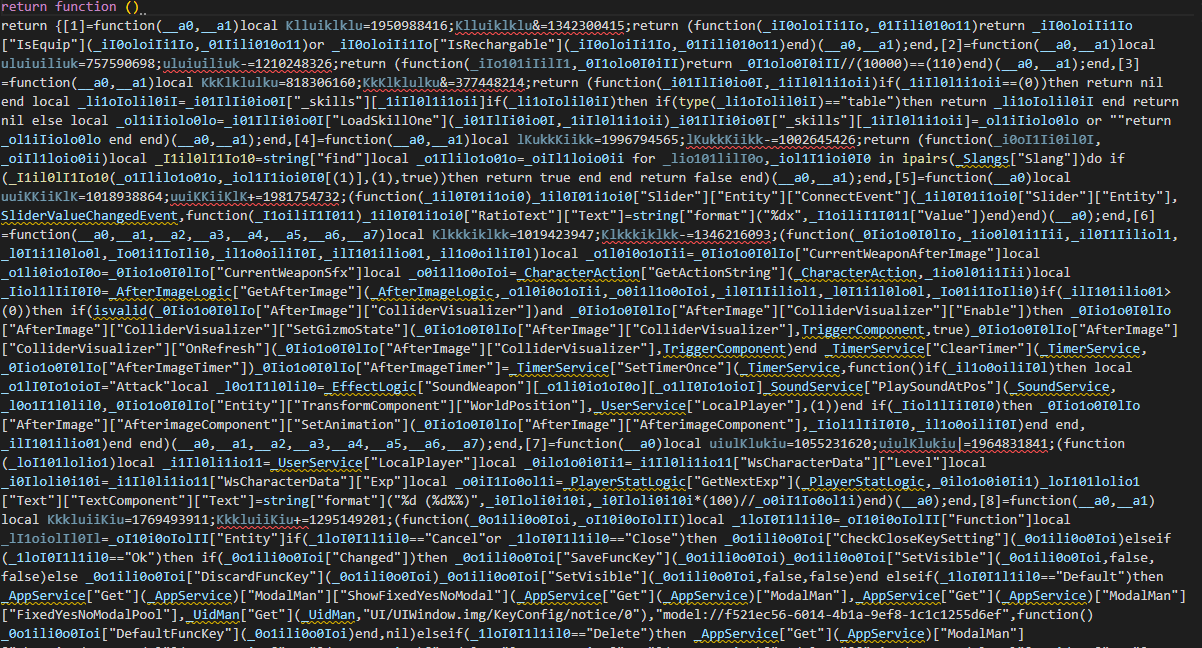 After Decryption
What I did was to replace the encrypted keys such as ["_ililIIIlIiillIlIlllIlIllIlliIiii"]["IIlilIIIIllliIilIIiilIIlliIIiIIiil"][3] to actual keys such as ["Entity"]["Parent"].
Now, we can match up encrypted scripts by using the number of arguments and unique keys.
Results
return (function(self)
    local local_1 = self["Get"](self)
    local local_2 = _UserService["LocalPlayer"]
    local local_3 = local_2["WsUser"]
    local_1["GetStatusBar"](local_1)["Hp"]["SetValue"](
        local_1["GetStatusBar"](local_1)["Hp"],
        local_3["Health"],
        local_3["MaxHealth"],
        _StatusBarElementTypes["Hp"]
    )
    local local_4 = local_1["ControlWindowMan"]["Stat"]["StatWindowComponent"]
    local_4["Hp"]["UpdateHp"](local_4["Hp"])
end)
This is one of the deobfuscated scripts. As you can see, the encrypted keys are replaced with the actual keys.
Now, we can understand the script and analyze the script more easily without any confusion.
Conclusion
In this post, I have explained how to deobfuscate the Lua script by using the mapping functions.
The mapping functions are the functions that map the keys to the actual keys. By using the mapping functions, we can deobfuscate the Lua script and understand the script more easily.
I hope this post helps you to understand the Lua obfuscation and its deobfuscation.
If you have any questions or suggestions, please feel free to leave a comment below.
Thank you for reading!